




How to Set up Carwash Facebook and Instagram Ads
YOUR FACEBOOK AND INSTAGRAM CARWASH ADS CHEAT SHEET:
Alas, Facebook is no more. Long live Facebook!
Rumors of Facebook and Instagram being dead or dying platforms are just that: Rumors. Especially in the carwash industry, targeted Facebook and Instagram ads are still some of the cheapest and most effective ways to promote your wash business, push promotions, and cater to a very specific audience type.
Want to get started, but don't know how? Try following the steps below!

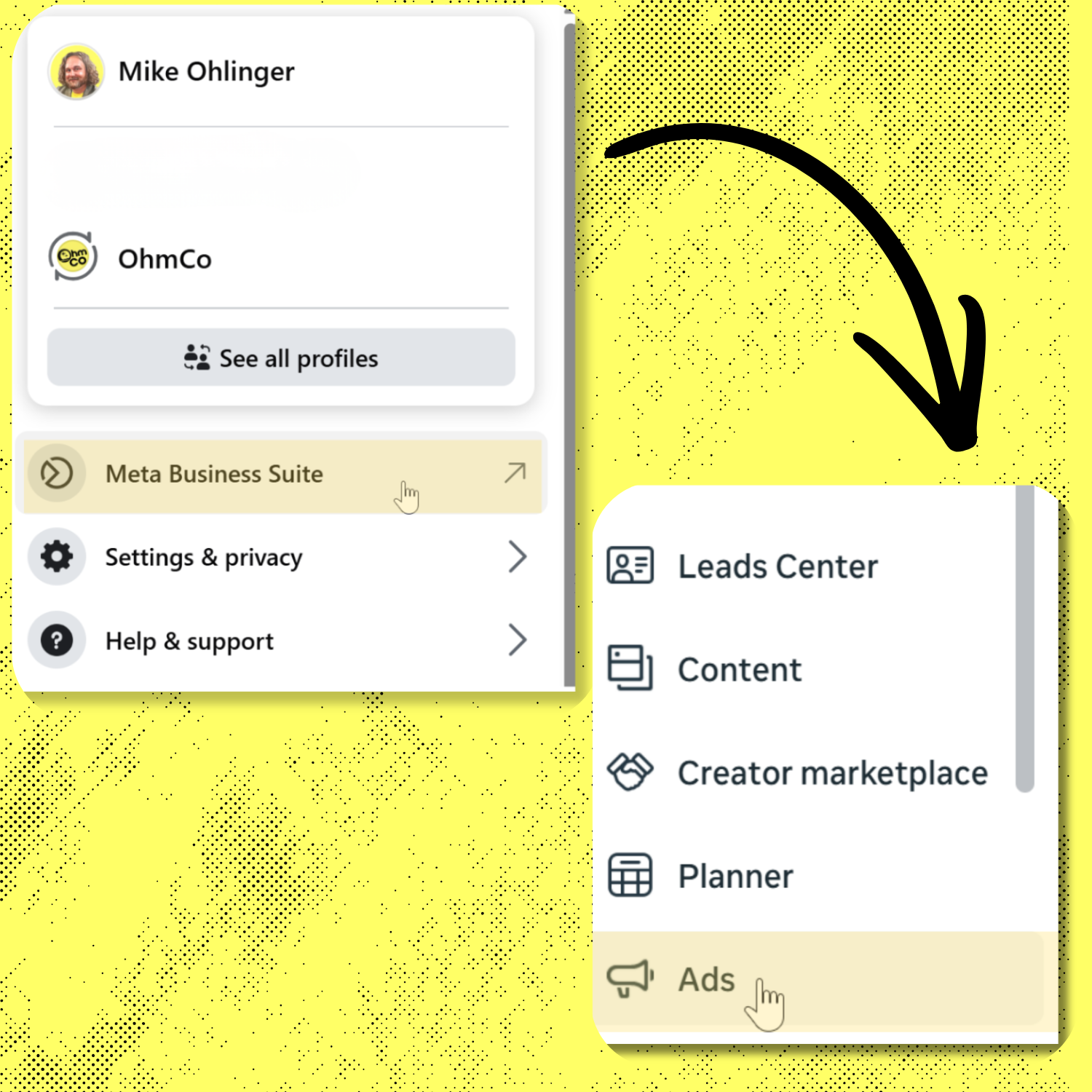
Step 0: Open the right tool
- Go to Meta Business Suite (from your Facebook Page, tap Professional dashboard or Meta Business Suite).
- In the left menu, choose Ads (or Advertising).
- If you don’t see it, look for All tools → Ads.
Step 1: Create a new campaign
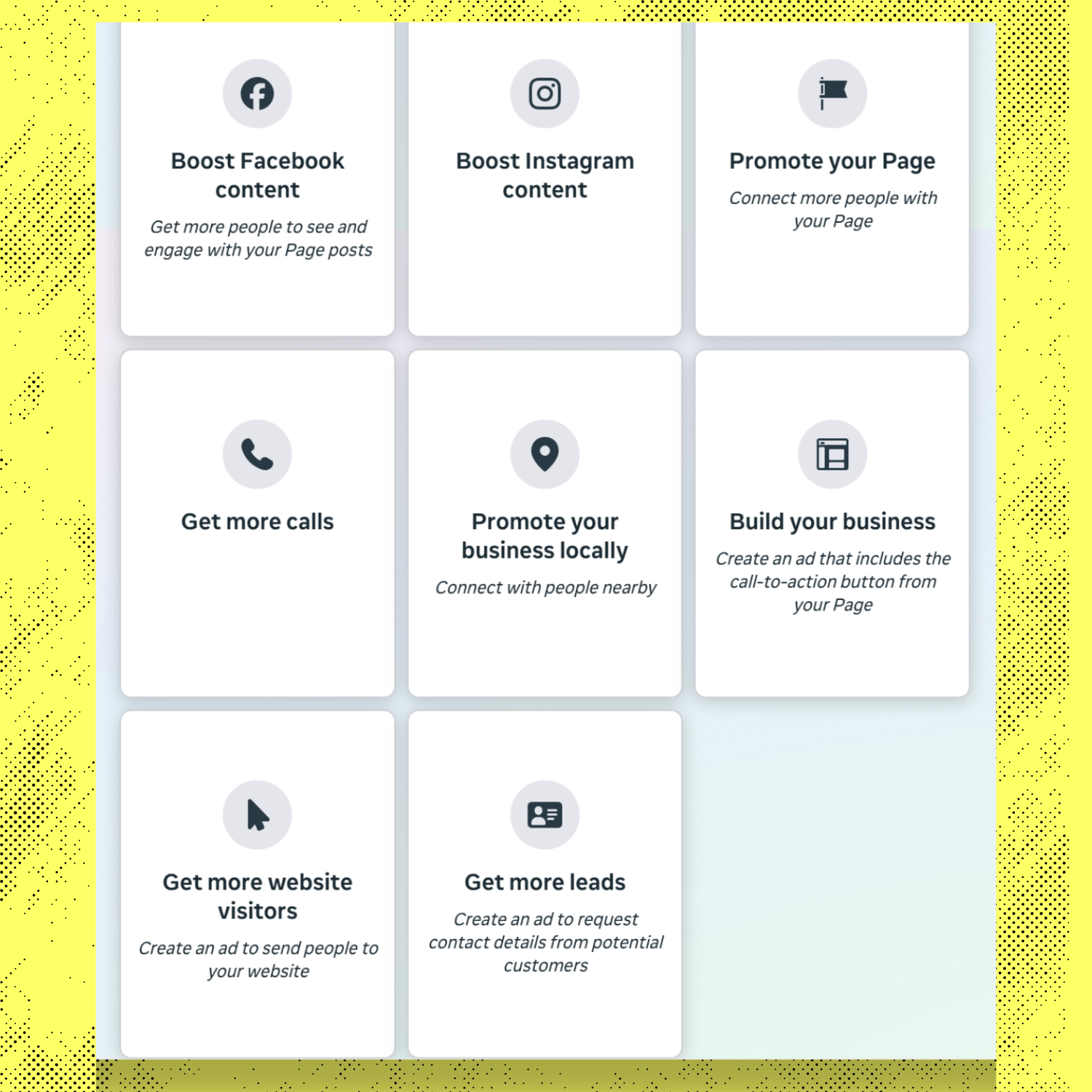
- Click Create ad (or Create).
- Choose the goal (Meta calls this the “Objective”): For carwashes, "promote your business locally", is a great way to drum up local organic traffic. "Get More Leads" and "Get More Website Visitors" is a solid goal if you're looking to enhance your membership pool.
- Click Continue.
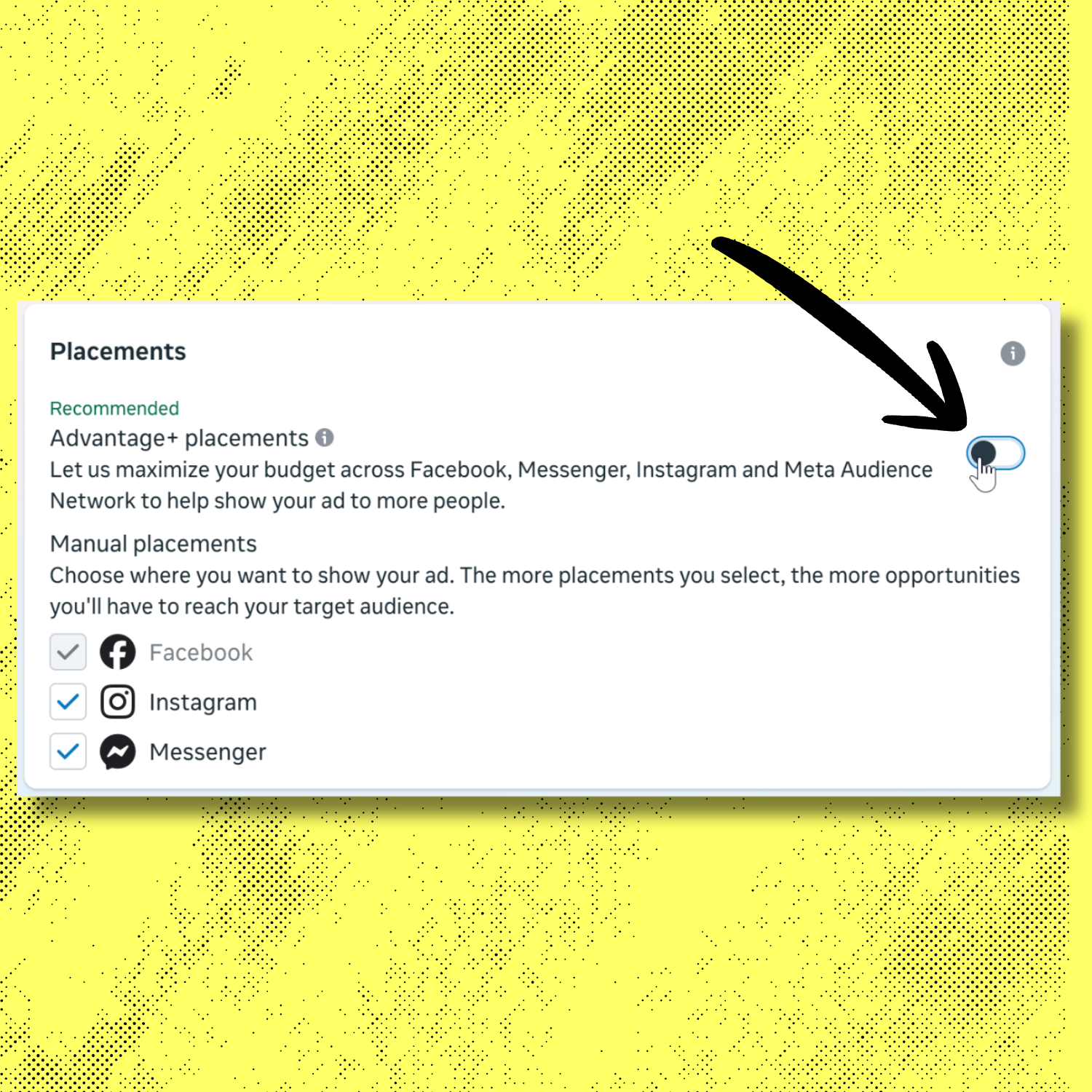
Step 2: Choose your placements (where the ad shows)
- Go to Placements.
- Choose Advantage+ Placements (recommended) to run on both Facebook + Instagram automatically.
- If you want to keep it simple and local, Advantage+ is fine.
If you want more control: choose Manual placements and keep:
- Facebook Feed
- Instagram Feed
- Stories/Reels (optional—works well for quick reminders)
Step 3: Set your audience (Members-first approach)
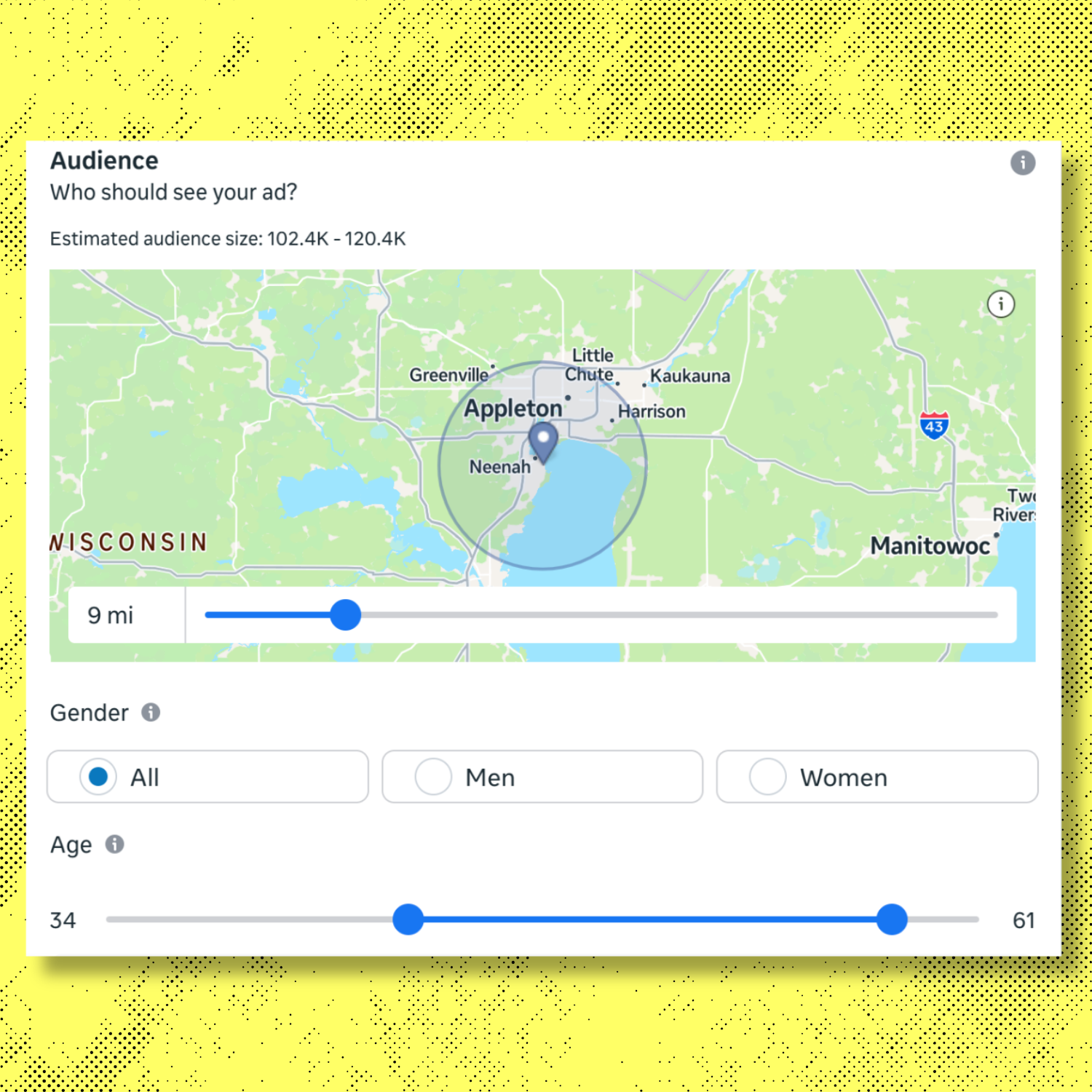
Option A (Easiest): Location-based “members live here”
- Go to Audience.
- Set your Location:
- Enter your wash address
- Choose a radius (often 3–10 miles depending on your market)
- Set Age to your typical buyer range if you want (or leave broad).
- Skip interests unless you need them.
This works because members are local and Meta will learn who responds.
Option B (Best if you have data): Custom audience
If you have a list of members (email/phone) or app users:
- Go to Audiences (in Business Suite: All tools → Audiences)
- Click Create audience → Custom audience
- Choose your source:
- Customer list (email/phone)
- Website (pixel events, if set up)
- Instagram account engagement
- Facebook Page engagement
- Create it, then select it in your campaign’s Audience section.
Member targeting expert move:
Use
Engaged with Instagram/Facebook in the last 365 days as a “warm member-like” audience if you don’t have a member list.
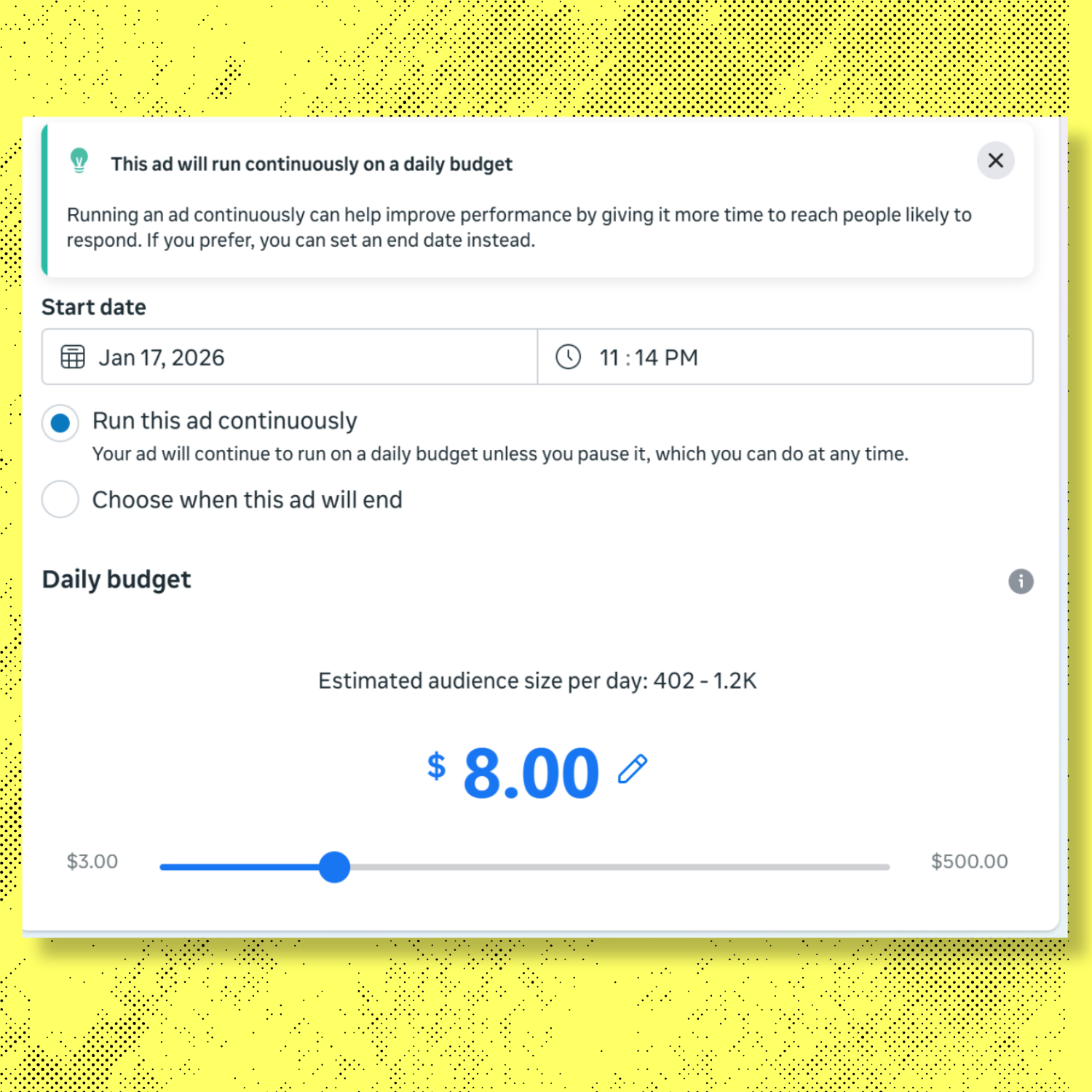
Step 4: Budget & schedule
- Choose Daily budget (simple) or Lifetime (fixed total).
- Start modest, then scale after you see results.
- Schedule:
- For member reminders, consider running 7–14 days at a time.
- Or run continuously and swap creatives monthly.
Step 6: Build the ad (creative + copy)
- Choose the Facebook Page and Instagram account.
- Add your media:
- A real photo of your wash, tunnel entrance, or a clean car exiting
- Keep it authentic (stock photos usually underperform)
3.Write your primary text (member reinforcement,
not sales).
Plug-and-play member ad copy (use one)
Option 1 (Salt reminder)
“The roads were salted again this week. Good reminder that your Wash Club membership is here to protect your vehicle—not just make it look clean.”
Option 2 (Routine reinforcement)
“Busy week? That’s why members stop in more than once. Quick in, quick out—one less thing to think about.”
Option 3 (Usage reassurance)
“If you’ve only washed once this month, you’re still using your membership exactly the way it was meant to be used—flexible and ready when life gets messy.”
- Add a Headline (short):
- “Wash Club Reminder”
- “Salt’s Back”
- “Stop In Anytime”
2.Choose a Call to Action:
- Get Directions (best if you have a map listing)
- Learn More (if you send to a member page)
- Send Message (only if someone will reply)
For members, “Get Directions” is usually the highest-intent CTA.
Step 7: Double-check before publishing
Before you hit Publish, confirm:
- Audience is local and/or custom members
- Objective matches your goal (Engagement/Traffic)
- CTA makes sense (Directions > Website in many cases)
- You’re not accidentally promising a discount
Then click Publish.
Step 8: How to tell if it’s working (without overthinking)
Inside Business Suite → Ads → Results:
- If Engagement objective: watch Reach, Frequency, and Post engagement
- If Traffic objective: watch Link clicks and Landing page views (if available)
Offline reality checks:
- Ask your cashier/attendant: “Are people mentioning seeing us online?”
- Watch member wash counts and cancellations week-over-week
Retention ads often look “quiet” in the dashboard but show up as stability.

Option A (Recommended): Run Instagram Ads Through Meta Ads Manager
Step 1: Open Ads Manager
- Go to Meta Business Suite (from Facebook) or business.facebook.com.
- Click
Ads (or
All tools → Ads Manager).
Step 2: Create a campaign
- Click Create ad (or Create).
- Choose the goal (Meta calls this the “Objective”): For carwashes, "promote your business locally", is a great way to drum up local organic traffic. "Get More Leads" and "Get More Website Visitors" is a solid goal if you're looking to enhance your membership pool.
- Click Continue
Step 3: Set the budget and schedule
- Choose Daily or Lifetime budget.
- Set start/end dates (or run continuously).
Step 4: Choose Instagram-only placements
- Go to Placements.
- Select Manual placements.
- Uncheck everything except Instagram:
- ✅ Instagram Feed
- ✅ Instagram Stories
- ✅ Instagram Reels
- ✅ Instagram Explore (optional)
4.Continue.
Tip: If you want "easy,” choose Feed + Stories/Reels and skip the rest.
Step 5: Define your audience
Simple member-focused audience (no list needed):
- Location: set your wash address + a radius (ex: 3–10 miles)
- Age: keep broad unless you know your buyer range
- Interests: optional—don’t over-layer
Better member audience (if you can):
- Go to Audiences (All tools → Audiences)
- Create a Custom audience from:
- Instagram account engagement (people who engaged with your IG)
- Customer list (emails/phones of members, if available)
3.Apply that custom audience in the Ad Set.
Step 6: Build the Instagram creative
- Choose your Instagram account.
- Add your image or video (prefer real wash content).
- Write your caption (Primary Text).
Plug-and-play member ad copy (Instagram-friendly):
- “Salt’s back on the roads. That’s your reminder—your Wash Club membership is here to protect your vehicle, not just make it look clean. Stop in anytime.”
- “Busy week? That’s exactly why you joined. Quick wash, quick reset—one less thing to think about.”
- “If you’ve only washed once this month, you’re still using your membership the way it was meant to work: flexible, ready when life gets messy.”
- Choose a CTA:
- Get Directions (best for local visits)
- Learn More (if you have a member page)
- Send Message (only if you respond quickly)
Step 7: Publish
- Review everything.
- Click Publish.
Step 8: Check performance
In Ads Manager, look at:
- Reach and Frequency (are members seeing it enough?)
- Link clicks (if Traffic)
- Engagement (if Engagement)
For retention, also watch:
- member visit frequency
- cancellations week-over-week
- “I saw you on Instagram” mentions
Option B (Fast): Boost a Post on Instagram
Step 1: Post normally
- Open Instagram.
- Post a photo/video that feels real and relevant (salt, rain, seasonal).
Step 2: Tap “Boost post”
- On the post, tap Boost post.
Step 3: Choose your goal
- More profile visits
- More website visits
- More messages
For members: More profile visits or More website visits is usually best.
Step 4: Choose audience
- Tap Create your own audience.
- Set:
- Location near your wash
- Age (optional)
- Interests (minimal)
Step 5: Set budget and duration
Pick a modest daily budget and a short run (ex: 7 days), then start.
Step 6: Pay and publish
Confirm payment method and run.
Important note: Boosting is easy, but less controllable than Ads Manager. Great for beginners, not ideal for tight ROI optimization.
Try It
Ad spend can go a long way on these social media platforms, even today. Devising an incremental ramp for your ad spend to see what sticks and what doesn't is key --- eventually you'll find that sweet spot between daily spend and ROI.
Shore up your creative, brainstorm some promotions that will resonate with your local demographic, and start pushing your content towards to-be washers!
SHARE ONLINE